✅ Leading manufacturer of high-end digital locks - Kaadas has over 39 years of experience in the digital lock industry. ✅ Your trusted brand - Kaadas has transformed lives of over 6 million homeowners in 36 countries across the globe. ✅ Highest standards of quality - With 5 research labs globally, Kaadas has a team of experienced engineers who are constantly creating new and innovative ways to make everyday life easier for every household. ✅ The digital lock for all - Kaadas has a variety of digital locks for you to choose from. You will be able to choose a digital lock that is perfectly suited to your needs and lifestyles. ✅ Our supercars DNA - The only digital lock brand in the world that has collaborated with European luxurious automobiles such as Lamborghini. ✅ No hidden costs - Free pre-purchase consultation, delivery & installation, and 2 years on-site warranty. ✅ Aftersales service - Availability of aftersales service support, easy to contact and get in touch with us.
Yes, every digital lock purchased comes with free delivery and installation.
Where do I register my warranty?
You may find more information about Kaadas's warranty.
What are the possible date and time for installation?
Installation is available from Monday to Sunday between 9 am and 6 pm. After carting out, we will contact you to arrange for delivery. You can specify your desired delivery date and time. We will do our best to accommodate your preferred timing.
We will inform you via SMS or Whatsapp once your delivery date and time are confirmed.
Any trip cancellation or rescheduling that occurs within 3 working days will be charged a $50 fee . A cancellation charge will be imposed after a grace period of 15mins upon installer's arrival. This is to prevent any delay for the next job site.
Dual unlocking
What door lock models are compatible for dual unlocking?
What are the verification methods that allow dual unlocking?
When opening my gate from the outside: Fingerprint, PIN code, Card, Remote Control
When opening my door from the inside: Remote Control
Why doesn't my gate unlock when I open my door lock from the inside?
Refer to the "Verification methods that allow dual unlocking" above.
Dual unlocking does not work when you open your door from the inside by: Pressing the Open/Close button Using the lock levers
If I do not wish to use the dual unlocking, can I change it back?
Yes, you can simply unpair by logging off the network on the door lock. Refer to the pairing steps in user settings, select #2 log off in the door lock to unpair. Alternatively, you can simply remove the module from the door lock.
How do I set up the dual unlocking function?
On the back body of your locks: Ensure that your modules are plugged in. 2. On the front body of your door lock (Refer to your respective models): K9, L7, R6 and RX-C • Go into the master mode of the door lock, select function extension (press 4 for L7 and R6, 5 for K9 and 8 for RX-C) and press 1 to join a network • Double click the hole of the module at the gate lock.
The Legend • Wake your gate lock by touching the screen. • Go into the master mode of the gate lock, select 5 (to set-up wireless function) and press 1 to join a network • Double click the hole of the module at the Legend • Switch the module of the gate lock and door lock • Pair the remote for the gate lock to the module in the gate lock
What if I already installed a Kaadas gate lock and Kaadas door lock, can I still upgrade to have this function?
Yes. Please reach out to Kaadas Singapore at 8076 0872/ 8811 5869 via Whatsapp to arrange an upgrade. The upgrade will cost $100.
Other resources
Remote control
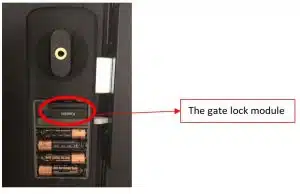
There could be 3 reasons why your gate lock is not reacting to the remote. To solve the issue, please try the following methods: 1. Gate lock module is loose The module on the gate lock may have become loose when excessive force is applied when closing the gate. Excessive force ranges from banging on the lock with solid items to slamming the door closed. To fix the module:
Open up the back cover
Plug out the module
Re-insert the module. Ensure that all 8 pins are plugged in fully.
Test to see if the remote can work now.
2. Low battery of your remote control Watch how to change your remote-control battery here
Note: It is advisable to use the Energizer CR2032 battery as we noticed issues with other brands. When changing the battery, please be careful of the gold clip holding the battery in place. Test the remote and if the issue persists, please try the next step. 3. Re-pair the remote to the lock Take the following steps to pair your remote:
press #
Enter master PIN then #, press 5
Press 1 to add network
Use a small pin to press the back of the controller
Press unlock on the controller
If the issue persists after all 3 steps were taken, please contact us via WhatsApp at the following number:
WhatsApp: 8711 6780 / 8824 0463
What type of batteries should I use for my digital lock?
Kaadas digital locks require only 4 x 1.5V AA alkaline batteries. For models with 8 batteries compartment, we recommend using only 4 batteries at one time to reduce the probability of battery leakages. Use reliable battery brands to prevent battery leakage which could damage your lock. Digital lock damaged from battery leakage is not covered under warranty
Brands such as Panasonic Evolta and Duracell have proven to be more reliable as compared to other brands such as Ikea and GP where battery leakages were encountered before. In addition, please do not use:
Carbon-zinc type battery
Rechargeable batteries
Lithium batteries
Heavy duty or super heavy duty batteries
How often should I change my battery?
Batteries should be changed immediately once the low battery indicator lights up. In addition, we recommend customer to change all 4 batteries once every 6 months (even if there is no low battery indicator) as batteries with low power are more prone to battery leakages.